Pages

Showing posts with label free cut file. Show all posts

Friday, July 17, 2020

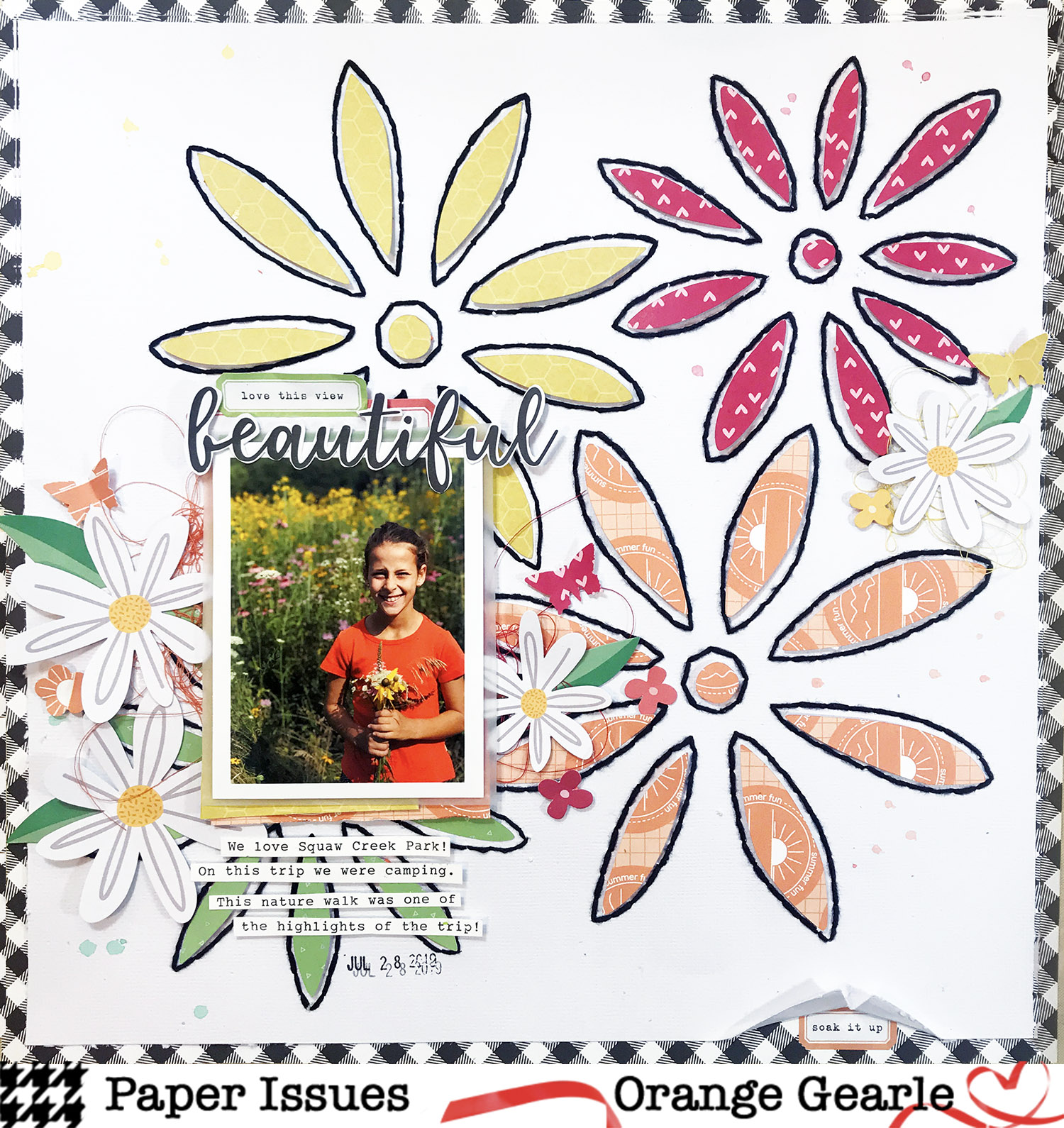
..:: beautiful ::..

Hi Friends! I am up on the Paper Issues blog today with a layout using one of the Free Cut Files available in the Paper Issues Store.  This is a fun one! The cut file is called Stitching Flowers Background and it cuts the holes in your paper so you can stitch! Here is my layout:


The free cut file also includes the "inside" cut so you can add paper to the insides of the flowers. I chose yellow, green, red, and orange. 


I popped up the patterned papers with some foam to add some dimension to the flowers.


Many of the papers and embellishments are from Elle's Studio and can be found here.


This was a super fun layout to make!  I made a video of my process if that's something that suits your fancy!


I am posting this one in the Free File Free-For-All challenge. You can find this and all of our current challenges in the July Challenge album in our Facebook Group. You have plenty of time to participate. Play along until August 2, for a chance to win a gift card to the Paper Issues Store. Shop the store using the code OrangeGearle for 20% off your purchase.


Thanks for stopping by and I will see you again soon! XO o.g.

Thursday, June 25, 2020

..:: grill skills ::..

Hi Friends! I am up on the Paper Issues blog today with a layout for the Grill Skills challenge over in the Paper Issues {Friends and Fans} Facebook Group! I used the Simple Stories Summer Farmhouse collection and the Whip Up Some Baked Goods free cut file


I used the fantastic floral patterned paper for a strip down the center. Next I added some strips on either side from the 6x8 paper pad - and I used my machine to stitch it all down with red thread. Then, I grabbed some floral embellishments from the collection for my clusters.


I backed the cut file with some patterned paper and added some red embroidery floss in the holes of the handle (that's my favorite part!). This cute apron and grill fit the theme perfectly!


I made a video of my process if that's something that suits your fancy!


You can find this and all of our current challenges in the June Challenges album in our Facebook Group. You have plenty of time to participate. Play along until July 5th, for a chance to win a gift card to the Paper Issues Store. Shop the store using the code OrangeGearle for 20% off your purchase.


Thanks for stopping by and see you again soon! XO o.g.

Friday, May 29, 2020

..:: let's go fly a kite ::..

Hello Friends!  I am up on the {a flair for buttons} blog today with a layout using two pieces of flair from the Watercolor Patterns Flair set and once flair button from the Tropical Vacation Flair set. I am also working with papers from Paige Evan's Bloom Street collection and a free cut file from Paper Issues. Here is a look at my layout:

AFFBKiteFlair

I used a sketch by Devra Hunt that can be found here. Here are a few close-ups of the flair I used:

AFFBKiteFlair

The piece above is from the Tropical Vacation Flair set and I thought it made the perfect "sun" and pop of yellow. The two pieces below are from the Watercolor Patterns Flair set. I thought they matched this collection so well, and I love that they add the perfect pop of color and even out my triangle and draw my eyes across the page.

AFFBKiteFlair

AFFBKiteFlair

I fussy cut a bunch of flowers to make clusters around the flair, and all across the page!  Here are a few more close ups:

AFFBKiteFlair
AFFBKiteFlair

AFFBKiteFlair

I added pop dots behind my kite to pop it off the page a little bit. I made a video of my process if that's something that suits your fancy!


Thanks for checking it out and I will see you again soon! XO o.g.

Saturday, March 7, 2020

..:: snow happy ::..

Hi friends! I am up on the Paper Issues Blog with a layout using Pinkfresh Studio's My Favorite Story collection and the Life In Pictures FREE cut file from the Paper Issues Store.


I used black card stock and cut out the film strip part of the cut file. I sized my photos to fit inside the strips. I like that I was able to get so many photos on the page using this free file!


I wanted to use this lovely rainbow paper because the snowman they made used so many rainbow colors in the buttons, scarf, and mittens. There are beautiful florals included in the ephemera pack for this collection, but I thought snowflakes might fit the story a little better. I used a punch and paper from the 6x6 paper pad to make snowflakes in the matching rainbow colors.


I added some pops of black throughout the page and I also added some of the chipboard flair from the collection -- in all the matching colors!


Here are a few more close ups: 


I made a video of my process if that's something that suits your fancy!


You can find this and all of our current challenges in the March Challenges album in our Facebook Group. You have plenty of time to participate. Play along until April 5th for a chance to win a gift card to the Paper Issues Store.  Shop the store using the code OrangeGearle for 20% off your purchase. Thank you for stopping by!  See you again soon! XO o.g.


Friday, February 7, 2020

..:: right now this girl ::..

HI Friends! I am up on the Paper Issues blog today layout and process video for the February Sketch Challenge! Here is a look at my layout :


Here is the sketch : 


I followed the main idea of the sketch -- a wreath design with two overlapping photos and some embellishments in two clusters. I didn't follow it exactly, but I think you can tell I used this sketch as inspiration for sure. I also used my Silhouette Cameo software and a sketch pen to journal around the circle!


I cut the Heart Wreath free cut file out of white card stock, then I backed some of the hearts with papers from the 6x6 Doodlebug Love Notes paper pack.  Before putting it down on the page, I added some pink and read Vicki Boutin paint behind the cut file. 


I stitched some of the hearts using some yellow embroidery floss. I also added some to my photo, because the sketch indicates some embellishment on the photo. 


I used a couple of banners and speech bubbles from the Chit Chat Ephemera pack as embellishment along the wreath and also in the top left and bottom right of the page. 


For my title I cut "This Girl" free hand out of the same 6x6 papers I used to back the cut file. Each sentence in my journaling starts with the words, "Right now this girl", so that's what I used as my title.

I did make a video of my process if that's something that suits your fancy!


You can find this and all of our current challenges in the February Challenges album in our Facebook Group. You have plenty of time to participate. Play along until March 1, for a chance to win a gift card to the Paper Issues Store. Shop the store using the code OrangeGearle for 20% off your purchase. Thank you for stopping by!  See you again soon! XO o.g.

Tuesday, January 28, 2020

..:: world kindness day ::..

Hello Friends!  I am up on the Paper Issues Blog today with a layout for the Take 5 Challenge going on over in the Paper Issues {Friends & Fans} Facebook group.  For this challenge I used 2 photos, silver, sequins, black, and enamel dots.  Here is a look at my layout:


Here is the challenge:


I started with the Heart Multiplied free cut file from Paper Issues. I used white card stock to cut it out, with the idea that I would back it with pretty papers!  There are hearts included in the cut file that you can cut to back the file -- it works perfectly. I used papers from the 6x8 pad in the Unforgettable collection from Cocoa Vanilla Studio to cut out hearts to back my file, and a few extras to layer. Here are a couple close ups:


Once I had the file backed, I sewed down the of the filled hearts using my sewing machine.  I also layered some extra hearts, sewing them down the middle, to use as embellishment across my page. I grabbed some flowers and leaves from the embellishment package and clustered those around the page as well.


I made a video of my process, if that's something that suits your fancy!


You can find this and all of our current challenges in the January Challenges album in our Facebook Group. You have plenty of time to participate. Play along until February 2, for a chance to win a gift card to the Paper Issues Store. Shop the store using the code OrangeGearle for 20% off your purchase.

Thanks for stopping by today, and I will see you again soon! XO o.g.


Saturday, May 4, 2019

..:: flower child ::..

Happy interNational Scrapbooking Day!  I will have two new layouts and videos up today with a challenge for each!  Let's get started!  The first is a layout I did as part of the design team at The Cut Shoppe. Here is my layout:


I am using one of the four free cut files the Cut Shoppe is giving away today. The one I am using is called Fabulous Floral. There are so many things going on today over at The Cut Shoppe Scrap Spot on FB, you can check them out here. (My challenge will be tomorrow)! Here is the file: 


Here are all of them!


I am using a bunch of lovely papers and embellishments from Cocoa Vanilla Studios's Happiness collection -- which are in the iNSD Clique Kit (Limited Edition).  Here are a few close ups:


I love these colors and they match my daughter's shirt! 😀 Such a lovely cut file!  I also made a video of my process if that's something that suits your fancy!


Here is a discount code for you, too!


Thanks for stopping by!  See you later today with another post and another video! XO o.g.